Nearby hotspots at a glance
View nearby free WiFi locations and pick the closest option.
Find free WiFi near me in Paris now — open the public hotspot map for directions, tickets, translation and emergency connection checks.
Use this page when you need a nearby public hotspot right now. cacaou helps you find free WiFi near your current street for maps, translation, museum or train ticket checks, and other short emergency connections.
The WiFi layer focuses on nearby public hotspots so you can quickly find a reachable emergency connection for directions, tickets, translation or urgent messages.
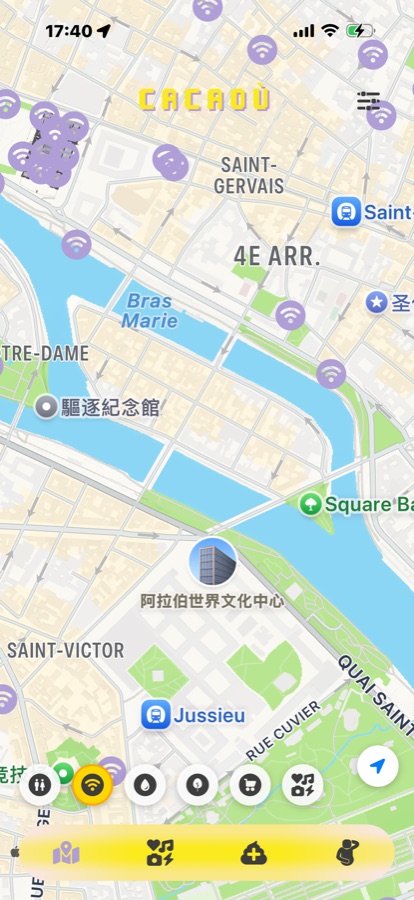
cacaou WiFi map: example public hotspots in central Paris
Because needing WiFi usually means you are already outside and need a quick answer. cacaou helps you see nearby public hotspots first, then choose a reachable option around your current street.
cacaou maps free public WiFi in Paris for short, nearby connections. For stable all-day or private internet, use your own mobile data or another provider.
Travelers checking directions, people translating on the street, commuters confirming tickets, anyone sending urgent messages, or users whose mobile data is weak or unavailable.
When you search for free WiFi near me in Paris, the useful answer is not a long directory — it is a short list of reachable hotspots around your current street. Use cacaou to compare nearby public WiFi points, then choose the one that fits the next few minutes of your trip.
The map workflow is built for quick mobile decisions: open cacaou, check the closest WiFi markers, and walk toward a practical option near a station, museum, cafe, library, park or public venue. It is especially useful when search queries like closest WiFi or free WiFi Paris map need a location-based answer.
Use cacaou for short public connections: maps, translation, messages, tickets and urgent travel checks. For sensitive work or anything that needs a stable private connection, use your own mobile data.
The map is intentionally focused on public hotspots around your current location and quick street-level decisions.
Treat free public WiFi as a short-task connection. It is fine for maps, opening a ticket, translating a sign or sending a message, but avoid banking, payments and sensitive account changes unless you are on mobile data or a trusted VPN. If a hotspot portal looks wrong or asks for too much information, leave it and try another nearby marker.
If you already use a VPN you trust, turn it on before signing in to public WiFi. For passwords, payments and account recovery, the safer fallback is your own mobile data.
Hotspot density can vary near train stations, libraries, parks, cafes, shopping streets and other public spaces. Open cacaou when you arrive nearby so the map can show practical options around your current location.
Connect faster, walk less
View nearby free WiFi locations and pick the closest option.
Jump from map point to route guidance in seconds.
Chinese, English, and French for both travelers and locals.
Open cacaou and use the WiFi layer to compare nearby public hotspot markers around your current street, station, landmark, park or cafe area, then walk to the most practical option.
Use Paris public WiFi for short, low-risk tasks such as maps, translation, tickets and messages. Avoid banking, payments and sensitive account changes unless you are on mobile data or a trusted VPN.
A trusted VPN adds protection on public WiFi, especially if you must sign in or open personal accounts. For the safest option, keep sensitive work on mobile data instead of public hotspots.
Open the map in the app to see nearby free public WiFi hotspots and navigate to them.
We refresh open-data and partner feeds regularly; real coverage and captive portals depend on each provider.
You can usually browse the map without one; if a hotspot needs SMS or a portal login, follow its instructions.
Yes—public toilets, drinking fountains, green spaces and Paris activities on the same map workflow.
Train stations, tourist areas, libraries, cafes, shopping streets and large public venues are often richer; trust what you see around your location in the app.
Yes, public hotspots are often more useful near stations, landmarks, libraries, parks and tourist areas, but signal and sign-in portals vary by provider.
Keep the Paris WiFi map ready when you are out